Master Your 2026 Content Strategy with this LinkedIn Planner
Consistency on LinkedIn is the bridge between obscurity and authority, yet maintaining a professional publishing schedule often feels like a second job. For entrepreneurs, marketers, and designers, the pressure to deliver high-quality content while managing daily operations can lead to burnout. The 2026 Post Planner for LinkedIn® Canva Template is designed to alleviate that pressure, transforming content planning from a chaotic scramble into a streamlined, visual workflow. This isn't just a calendar; it is a comprehensive visual strategy toolkit tailored specifically for the professional atmosphere of LinkedIn.
A Visual System for Professional Growth
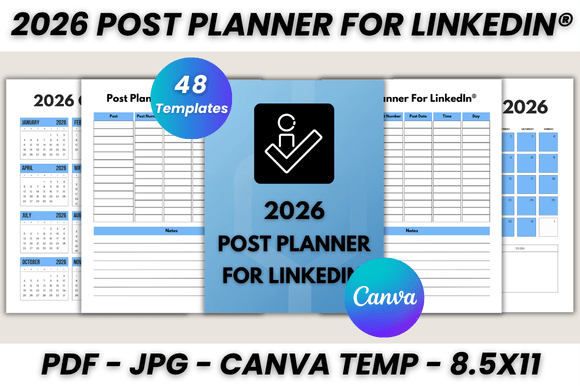
The core appeal of the 2026 Post Planner for LinkedIn® Canva Template lies in its ability to bridge the gap between high-level strategy and daily execution. Visually, the template balances modern minimalism with functional clarity. It avoids the clutter of over-designed planners, opting instead for clean lines, ample white space, and a structured grid that prioritizes readability. The personality of the design is authoritative yet approachable, making it suitable for corporate brand managers and independent freelancers alike. Whether you are managing a personal brand or a company page, the aesthetic adapts seamlessly, ensuring your planning process feels as professional as the content you intend to publish.
With 48 printable pages, the resource is substantial. It includes a Belongs To page for personalization, a full 2026 Calendar for macro-level planning, and a Monthly Planner covering every month from January through December. The inclusion of Important Notes and Notes sections ensures that you have space for brainstorming, drafting captions, or tracking analytics. This structure encourages users to think beyond simple scheduling; it prompts a holistic approach to content creation where visuals, copy, and timing are harmonized.
Practical Applications: From Desk to Digital
The true value of this asset is found in its versatility. While it serves as a printable desktop accessory—perfect for the creator who likes to sketch ideas with a pen before typing—the digital integration via Canva elevates its utility. As a premium font and layout system, it supports a workflow where physical and digital planning coexist. You can print the US Letter size pages to pin above your desk for a daily visual reminder of your upcoming posts. Simultaneously, the editable Canva files allow you to tweak the design on the fly.
Consider the small business owner preparing for a product launch. They can use the Monthly Planner to map out a content funnel, utilizing the Post Planner For LinkedIn® section to draft specific hooks for different audience segments. Because the template is fully customizable, the user can adjust the font size and colors to match their specific brand identity. This level of customization ensures that the planner doesn't just serve a functional purpose but becomes a cohesive part of your brand assets. The ability to resize the digital template means it works just as well on an iPad as it does on a printed sheet, offering flexibility for on-the-go planning.
Design Details and Usability
From a design perspective, the 2026 Post Planner for LinkedIn® Canva Template demonstrates a keen understanding of visual hierarchy. The layout guides the eye naturally from the month overview down to specific daily tasks and post ideas. This structure is vital for editorial design, ensuring that no critical date or idea gets lost in the noise. The typography choices within the template are modern and legible, reflecting current trends in sans serif and serif pairings that convey professionalism.
The template functions as a robust design asset for anyone looking to systematize their output. It is particularly effective for:
- Content Creators: Managing a mix of text posts, articles, and carousel uploads.
- Marketers: Aligning social media efforts with broader campaign timelines.
- Entrepreneurs: Tracking networking activities alongside content publishing.
The inclusion of Bonus JPG files is a practical touch, allowing users to quickly reference the design outside of Canva or PDF readers. Furthermore, the ease of editing—changing fonts, sizes, and layout styles—means you aren't locked into a rigid format. You can adapt the creative font choices to better suit your personal aesthetic, whether you prefer a handwritten font for a personal touch or a bold display font for corporate headers.
Streamlining Your 2026 Workflow
As we approach 2026, the demand for organized, strategic content will only increase. LinkedIn’s algorithm favors consistency and relevance, both of which are difficult to maintain without a system. The 2026 Post Planner for LinkedIn® Canva Template provides that system without requiring a steep learning curve. It is a digital download designed for immediate implementation—no shipping delays, no physical inventory to manage.
The process is intuitive: download the PDF, access the Canva link, and begin customizing. This frictionless entry point allows you to focus on what matters: the quality of your ideas. By utilizing the 30-page printable planner section dedicated specifically to LinkedIn, you can ensure that your professional presence is curated and intentional. It is a tool built for the modern creator, combining the tactile satisfaction of planning on paper with the efficiency of digital design tools.