Master Your 2026 Event Planning with This Canva Template
Organize Every Detail in One Editable System
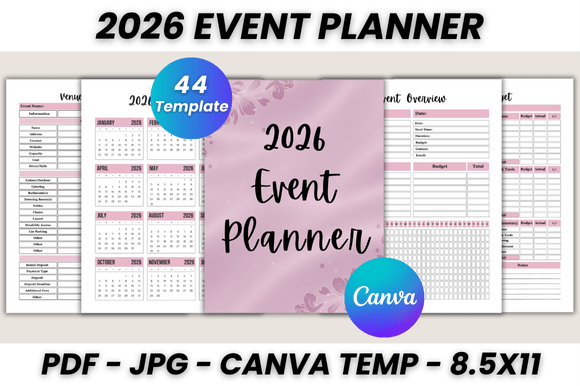
Planning an event for 2026 means juggling dozens of moving parts—guest lists, vendor contacts, seating arrangements, budgets, timelines, and last-minute changes. The 2026 Event Planner Canva Template brings all of that into a single, cohesive system you can edit directly in your browser. With 44 printable pages designed for real-world use, this template gives you a structured starting point without locking you into rigid layouts or outdated formats.
You get a full 2026 calendar alongside monthly planners spanning January through December. Each month includes space for notes, priorities, and deadlines, so you can map out your planning timeline alongside your personal or professional schedule. The Belongs To page at the front lets you personalize the planner immediately—whether it's for yourself, a client, or a team member.
Built for Real Event Scenarios
What makes this planner stand out is its focus on practical, event-specific pages. You'll find dedicated sections for event overview, event plan, event schedule, and venue information—the foundational documents any planner needs before diving into logistics. The event checklist and pre-event checklist help you track preparation stages, from confirming vendors to sending invitations.
The shopping list, products list, and purchased products pages work together to keep procurement organized. Track what you've ordered, what's arrived, and what still needs attention. The payment checklist and expenses tracker give you financial visibility throughout the planning process—no more scrambling to reconcile receipts after the event ends.
For guest management, you'll appreciate the guest list, special guest demand, and contact list pages. The special guest demand page is especially useful when coordinating accommodations, dietary needs, or accessibility requirements for VIPs. The seating plan and floor plan pages let you visualize the physical layout before you arrive at the venue.
Design Flexibility Inside Canva
Every page in this template is fully editable through Canva's free platform. You can adjust fonts, colors, layouts, and imagery to match your event's branding or your personal aesthetic. If you're designing for a corporate conference, swap in a professional color palette and clean sans serif typography. Planning a wedding or birthday celebration? Shift toward softer tones and script-style headers.
The template includes pages like invitation card ideas, invite ideas, and thank you cards—all customizable within Canva. These aren't just placeholders; they're designed with balanced composition and readable type hierarchy, so even minimal edits produce polished results. The gift planner page helps you track gifts received and thank-you notes sent, which is particularly useful for weddings, baby showers, and milestone celebrations.
Who Benefits from This Template
This planner works well for a wide range of users. Event planners and wedding coordinators can use it as a client-facing document or internal project tracker. Small business owners organizing product launches, pop-ups, or networking events will find the budget and vendor tracking pages especially practical. Content creators and marketers planning brand activations or influencer events can use the schedule and contact pages to coordinate across teams.
Even if you're planning a personal event—a family reunion, holiday dinner, or milestone birthday—the structure saves you hours of building spreadsheets from scratch. The event notes and my notes pages give you open space for brainstorming, capturing ideas, or documenting lessons learned after the event wraps up.
Practical Tips for Getting the Most Out of It
Start by filling out the event overview and event plan pages first. These two documents set the tone for everything else—they clarify your event's purpose, audience, budget range, and key dates. Once those are in place, the rest of the pages become easier to populate because you're working from a defined framework.
Use the catering companies and event contacts pages to centralize vendor information. Instead of searching through emails or text messages, you'll have names, phone numbers, and notes in one location. The important notes page works well for capturing contract terms, cancellation policies, or deposit deadlines that you'll need to reference repeatedly.
When you're ready to print, the template outputs in US Letter size (8.5 x 11 inches), though you can resize it within Canva for different paper formats. Print the full planner as a bound document for a comprehensive reference, or print individual pages as needed for meetings and site visits.
Why Structure Matters in Event Planning
A well-organized planner does more than keep you on track—it reduces stress, improves communication with vendors and team members, and helps you spot gaps before they become problems. The 2026 Event Planner Canva Template provides that structure without requiring you to build it yourself. The pages are logically sequenced, visually consistent, and designed to work together as a complete system.
Whether you're managing a single event or coordinating multiple throughout the year, having a reusable, editable template means less time formatting documents and more time focusing on the details that make your event memorable. The editable files mean you can duplicate the template for each new event, customize it for different clients, or adapt it as your planning needs evolve.
This isn't a generic planner with event-related labels pasted on—it's a purpose-built tool designed around the actual workflow of planning, organizing, and executing events in 2026.