Day Preview Planner | Canva Planner
There’s a specific kind of clarity that comes from knowing exactly how your day will unfold. For creative professionals, entrepreneurs, and busy households alike, that clarity isn’t just a nice-to-have—it’s the foundation of productivity and peace of mind. The Day Preview Planner from EveryDay! is designed to provide that structure, not as a rigid, one-size-fits-all system, but as a flexible, beautiful canvas that adapts to the way you actually work. This isn't a static PDF you print and forget. It's a dynamic, editable Canva template that puts you in the designer's seat, allowing you to craft a daily planner that feels uniquely yours.
A Template Built for Modern Creatives
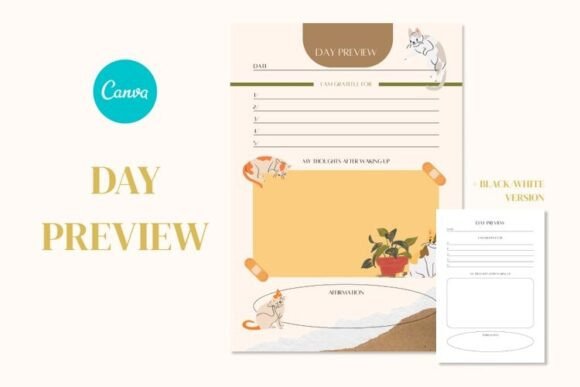
At its core, the Day Preview Planner is a two-page template set offering both a vibrant color version and a clean black-and-white iteration. This dual approach is a thoughtful nod to real-world use. The color version, with its carefully chosen palette, brings energy and visual distinction to your planning—ideal for those who use color-coding to differentiate between client work, personal tasks, and creative projects. The monochrome version offers timeless elegance, perfect for minimalist branding, professional contexts, or when you simply want to reduce visual noise and focus on the content. The overall style is modern and approachable, balancing clean lines with enough whitespace to prevent the page from feeling cluttered. It’s a design that respects your need for organization without sacrificing aesthetic appeal.
The real power, however, lies in its delivery as a Canva planner template. This transforms the asset from a simple printable into a living component of your digital workflow. Because Canva is a platform familiar to so many—from seasoned graphic designers to social media managers and small business owners—the learning curve is virtually nonexistent. You receive a ZIP archive containing a straightforward PDF with a direct link. Clicking that link opens the template directly in your Canva account, ready for customization. This method leverages Canva’s robust editing tools, meaning you can adjust fonts, colors, layout elements, and even add your own brand assets like logos or custom icons, all within a few clicks. It’s a seamless integration into the tools you already use.
Practical Applications Across Industries
Consider the entrepreneur mapping out product launches, investor meetings, and content creation blocks. With this template, they can color-code each category, creating a visual hierarchy that makes priorities instantly clear. A marketing professional might use the planner to storyboard social media campaigns, jotting down post ideas, scheduling times, and noting engagement metrics right alongside their daily tasks. For bloggers and content creators, it becomes an editorial calendar in its most granular form, helping to plan writing sessions, photo shoots, and publishing deadlines with precision.
The versatility extends beyond professional use. Crafters and hobbyists can plan project timelines, material lists, and workshop schedules. Families might use it to coordinate activities, meal plans, and appointments in a shared, visually organized format. The inclusion of both color and black/white versions means the same template can serve a corporate team meeting and a personal weekend planning session without feeling out of place in either context. It’s a single asset with multiple personalities, ready to be dressed up or down to suit the occasion.
Influencing Your Workflow and Brand Perception
A well-designed tool does more than just store information; it shapes how you interact with it. The clean, modern typography and balanced layout of this planner actively contribute to a more focused planning session. When your tools are aesthetically pleasing and intuitively organized, the act of planning becomes less of a chore and more of a creative ritual. This can have a tangible impact on your brand identity if you’re using the planner in a client-facing context—like sharing a project timeline or a content calendar. A polished, cohesive document reinforces professionalism and attention to detail.
From a practical standpoint, the template’s design promotes readability. The clear visual hierarchy—likely using weight and size to distinguish between time blocks, task categories, and notes—ensures that you can scan the page quickly to find what you need. This is crucial for maintaining momentum in a busy day. The ability to customize it within Canva means you can fine-tune this hierarchy to match your personal workflow. Prefer larger note sections? Adjust the layout. Need more prominent time slots? Resize the elements. The template provides the professional framework; you provide the personal nuance.
Getting the Most From Your Template
Upon purchasing, you’ll download a ZIP file containing the PDF instructions and the crucial Canva link. It’s important to note that the editing process is designed for a computer browser, where Canva’s full suite of tools is available. Once you open the link and save a copy to your own Canva account, the template is yours to modify indefinitely. You can create a master version for your brand and then duplicate it for each new week or project, ensuring consistency across all your planning documents.
While the template is pre-designed, think of it as a starting point for your own design assets. Experiment with pairing the existing fonts with others from your brand kit. Add your logo to the header. Use Canva’s vast library of icons to create custom symbols for recurring tasks. The goal is to move from a generic planner to a personalized system that feels like a natural extension of your workflow. If you encounter any hurdles during this process, the creator, EveryDay!, offers direct support, ensuring you can get help and make the most of your purchase.
Ultimately, the Day Preview Planner is more than a digital download. It’s a bridge between the need for structured daily management and the desire for creative control. It acknowledges that how we plan is as personal as what we plan, and it provides a professional, flexible tool to honor that individuality. In a world of rigid apps and generic printables, it offers a middle path: the polish of a premium template with the freedom of a customizable canvas.