15 Silhouette Dogs Editable Canva Frames for Creative Projects
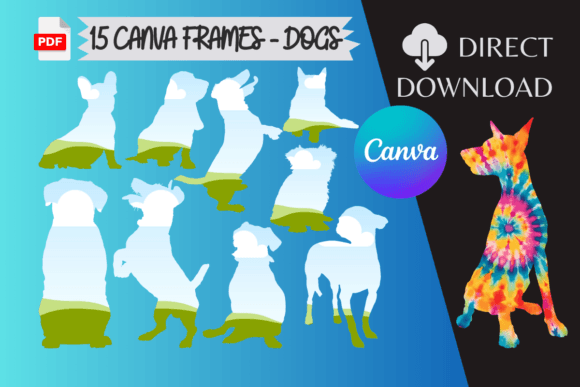
There's a particular challenge in digital design that many of us face: finding assets that are both visually distinctive and genuinely functional. We often encounter beautiful graphics that are locked in a static format, or editable templates that require software expertise we don't have time to master. The 15 Silhouette Dogs Editable Canva Frames collection directly addresses this common frustration. This isn't just a set of decorative borders; it's a practical toolkit designed for seamless integration into your workflow. The visual appeal is immediately clear—each frame features a clean, iconic dog silhouette that creates a dynamic border or focal point. The style is modern and versatile, balancing a playful personality with a professional aesthetic that doesn't overwhelm your core content. It's this blend of character and restraint that gives these frames their broad utility.
More Than a Pretty Border: The Real-World Utility
The true value of a design asset lies in its application. Where do 15 Silhouette Dogs Editable Canva Frames genuinely excel? Their strength is in their specificity combined with flexibility. For a pet groomer's social media graphics, a frame instantly establishes brand context without a single word. In publishing, imagine a blog post header for a veterinary clinic or a dog training service—the frame provides immediate thematic relevance. For marketers creating event flyers for a local dog park meetup or a charity pet adoption day, these frames offer a quick, professional solution that resonates with the target audience. The design itself influences engagement; the silhouette format is bold and recognizable, creating strong visual hierarchy that guides the viewer's eye inward to your message, photo, or call-to-action. This isn't about complex typography theory; it's about using a focused design element to achieve clarity and connection.
Practical Integration into Your Design Workflow
Understanding how to use these frames effectively is key to unlocking their potential. The process is intentionally straightforward, reflecting a modern approach to design asset delivery. The frames arrive as PDFs in a ZIP file—a direct download that bypasses complicated installation. Once unzipped, you drag each PDF into Canva. They appear in your "Projects" tab; select "All" to see them. Choosing a frame opens it on a new canvas. From there, you delete the default placeholder image, and the frame is ready for your own photos or graphics. This simplicity is a major advantage for busy creators.
When evaluating fit for a project, consider the frame's personality. The dog silhouettes are inherently friendly and energetic, making them ideal for brands and projects in the pet industry, family-oriented services, outdoor adventure themes, or any context where approachability is key. They might be less suitable for ultra-corporate or luxury minimalist branding unless used very subtly. A practical recommendation: test the frames with your actual content early in the design process. See how your logo interacts with the silhouette's negative space. Assess the readability of your text when placed over or near the frame. Because the frames are editable in Canva, you can adjust colors to match your brand palette, ensuring consistency across all your materials—from social media graphics and web banners to printed flyers and packaging labels.
Building a Cohesive Visual Language
Consistency is the bedrock of professional branding and publishing. Using a set like the 15 Silhouette Dogs Editable Canva Frames allows you to maintain a recognizable visual thread across multiple touchpoints. Think of them not as one-off decorations, but as part of your broader design asset library. A dog walker could use different frames from the set for each service highlight on their website, creating variety within a cohesive theme. A blogger could use them as recurring section dividers or featured image borders, building a signature style that readers come to recognize. The frames act as a creative font for your visual layout—a display element that adds personality without sacrificing the readability of your body copy.
When incorporating these frames, remember the principles of good design pairing. If the frame is bold and graphic, pair it with a clean sans-serif font for body text to maintain legibility. If you're using the frame in a more editorial design, like a magazine-style layout, it could complement a serif font used for headings. The goal is balance. The frames provide the visual interest and thematic anchor, while your typography and content deliver the message. This thoughtful combination elevates your work from simply using a template to crafting a considered brand identity. Whether you're a small business owner creating your own marketing materials, a crafter designing unique products, or a content creator establishing your niche, these frames offer a practical, stylish solution to make your projects stand out with authentic character.